We Ran Chrome’s New AI-Agent Audit on the 15 Biggest Ecommerce Sites
Lighthouse has always audited your site for humans. Performance, Accessibility, Best Practices, SEO — four categories, all of them asking some version of “is this good for the person looking at it?”
Chrome 150 added a fifth. Agentic Browsing asks a different question: can a piece of software that acts on a user’s behalf actually use this page — find the button, fill the form, finish the checkout?
Rather than theorise about it, we ran the audit against fifteen of the largest ecommerce sites on the web. The results were not what we expected, and the most interesting finding is not a score at all.
What Agentic Browsing actually measures
The distinction that matters is between reading and acting.
| Traditional crawler | Agentic browser | |
|---|---|---|
| What it does | Reads and indexes | Reads and acts |
| Typical action | Fetch HTML, follow links | Fill a form, click checkout, book a slot |
| Failure mode | Page not indexed | Task fails halfway through |
| What it needs | Crawlable markup | Predictable, labelled, stable controls |
A crawler that misreads your button label costs you a ranking position. An agent that misreads your button label abandons a cart.
Google marks the category experimental and under development. It is built on proposed standards that are not finalised, and the checks are expected to change.
Six audits, not four
Most coverage describes “four checks.” In Lighthouse 13.4.1 the category ships six audit IDs, because WebMCP is split into three. These are the real ones, taken from a live run:
| Audit ID | What it checks | Hard to fix? |
|---|---|---|
agent-accessibility-tree | Interactive elements have programmatic names; roles are appropriate; tree is well-formed | Medium |
webmcp-registered-tools | Page registers callable tools for agents | High — origin trial |
webmcp-schema-validity | Registered tool schemas validate | High |
webmcp-form-coverage | Key forms are exposed as agent tools | High |
llms-txt | Markdown summary at root domain — headers, length, links | Trivial |
cumulative-layout-shift | Layout stability | Medium — already measured |
Two of the six — accessibility and CLS — are things you should already be doing. That is the quiet part: a third of this audit is existing web hygiene, relabelled for a new audience.
The score is a fraction, not a percentage
This trips people up. Agentic Browsing does not produce a weighted 0–100 score like the other categories. You get a fraction of checks passed, individual pass/fail rows, and — critically — unimplemented agent features return N/A rather than a failure.
Google’s stated reasoning is that the standards are still emerging, so the focus is “to gather data and provide actionable signals rather than a definitive ranking.” The practical consequence is that a bare-bones site scores perfectly. You are not punished for doing nothing. You are only rewarded for doing something.
How to run it yourself
In DevTools: Chrome 150+, open the Lighthouse tab, confirm Agentic Browsing is in the category list, click Analyze page load. From the CLI it is scriptable and easy to diff in CI:
npx lighthouse@13.4.1 https://example.com \
  --only-categories=agentic-browsing \
  --output=json --output-path=./agentic.json \
  --chrome-flags="--headless=new --enable-webmcp-testing"
Watch your CLI version. A globally installed lighthouse is probably on 12.x, which does not have this category at all and will fail with an unknown-category error. Pin @13.4.1 or later. WebMCP testing additionally needs the origin trial (Chrome 149–156) or the local flag at chrome://flags/#enable-webmcp-testing.
How AI agents actually read your page
Before optimising, understand what you are optimising for. Agents have three ways to perceive a page, and they are not equal.
The accessibility tree is reported to be roughly 93% more token-efficient than raw DOM parsing. That gap is why it wins. Concretely: OpenAI’s ChatGPT Atlas reads ARIA tags, the same roles and labels that drive screen readers. Microsoft’s Playwright MCP operates purely on the accessibility tree with no vision model at all.
One attribute can make a link invisible
We ran the audit on our own site first, and failed it. Score: 0.5, one of two applicable checks. Three elements were at fault, and the most instructive was a link:
<a class="cmpstrip-card" role="listitem" href="/vs/rep-ai">That role="listitem" overrides the anchor’s implicit link role. To an agent parsing the accessibility tree, those comparison pages are not links. They are list items. An agent asked to compare us against alternatives cannot see a route there.
The fix is to stop putting list semantics on the link and move them to a wrapper:
// Before — the role clobbers the link
<Link href={`/vs/${slug}`} className="cmpstrip-card" role="listitem">

// After — wrapper carries list semantics, anchor stays an anchor
<div role="listitem">
  <Link href={`/vs/${slug}`} className="cmpstrip-card">
Our second failure was our own chat widget’s floating button — icon-only, no accessible name. Worth dwelling on, because that component is embedded across every site running the widget. One missing attribute does not cost one page a score; it costs every page that embeds it.
The benchmark: 15 of the biggest ecommerce sites
One homepage load each, Lighthouse 13.4.1, desktop preset, 29 July 2026. Only nine of the fifteen could be measured at all.
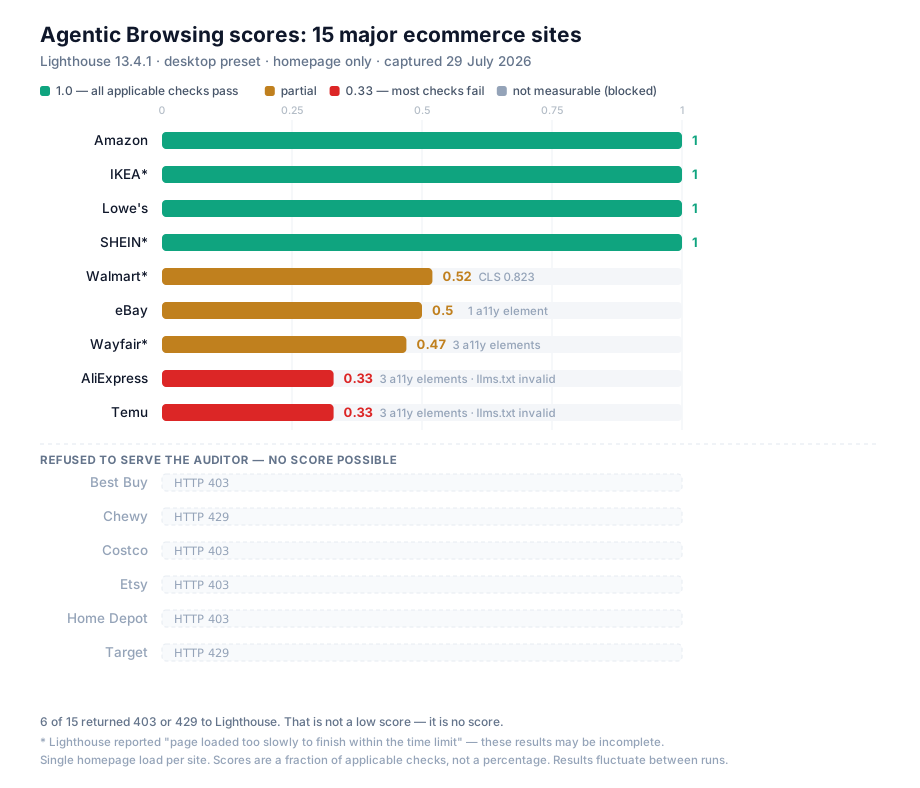
Finding 1 — six of fifteen refused to be audited
Best Buy, Costco, Home Depot and Etsy returned HTTP 403. Target and Chewy returned HTTP 429. Lighthouse never got a page to score.
This is the most important row in the table, and it is not a score. It is a different failure mode entirely: bot management at the edge, refusing automated traffic before any question of markup arises.
Finding 2 — four sites scored a perfect 1.0
Amazon, IKEA, Lowe’s and SHEIN passed every applicable check.
Amazon is the instructive one. No llms.txt, no WebMCP, nothing agent-specific whatsoever — and a perfect score, because its accessibility tree is clean and its CLS is 0. It confirms the scoring model in the wild: you reach 1.0 through ordinary discipline, not by adopting anything new.
SHEIN was the only site of the fifteen with a real, well-formed llms.txt:
# SHEIN

> [SHEIN Mobile Global](https://www.shein.com/): SHEIN's primary global
> website, a global fashion and lifestyle ecommerce platform.
> Note: SHEIN product pages follow the format
> https://{region code}.shein.com/{product slug}-p-{product ID}.html.
That last line is genuinely smart — it teaches an agent the site’s URL grammar so it can construct product links rather than hunt for them.
Finding 3 — a llms.txt you never wrote can still fail you
Temu and AliExpress both scored 0.33, the lowest measured. Both failed llms-txt. Neither has an llms.txt file.
Here is what happens. Both sites return HTTP 200 for every path — a bot-challenge page at Temu, an SPA shell at AliExpress. We verified with a nonsense URL:
https://www.temu.com/llms.txt                      → 200  text/html  2905b
https://www.temu.com/this-path-does-not-exist.txt  → 200  text/html  2932b
Lighthouse requests /llms.txt, receives 200 and a body, concludes the file exists, then fails it for not being markdown: “File is missing a required H1 header.” A site that returned an honest 404 would have scored N/A and lost nothing.
llms.txt is free. A malformed one costs you. And if your server answers 200 to everything, you have a malformed one whether you wrote it or not. Check yours: curl -sI https://yoursite.com/not-a-real-path.txt | head -1To be clear about where we stand on the file itself — we have argued at length that llms.txt is a sign nobody reads, and Google confirmed in June 2026 that it neither helps nor harms Search rankings. Nothing here changes that. Adding one buys you a Lighthouse check and nothing else. The genuinely actionable half of this finding is the soft-404 bug, which is worth fixing regardless of whether you ever write the file.
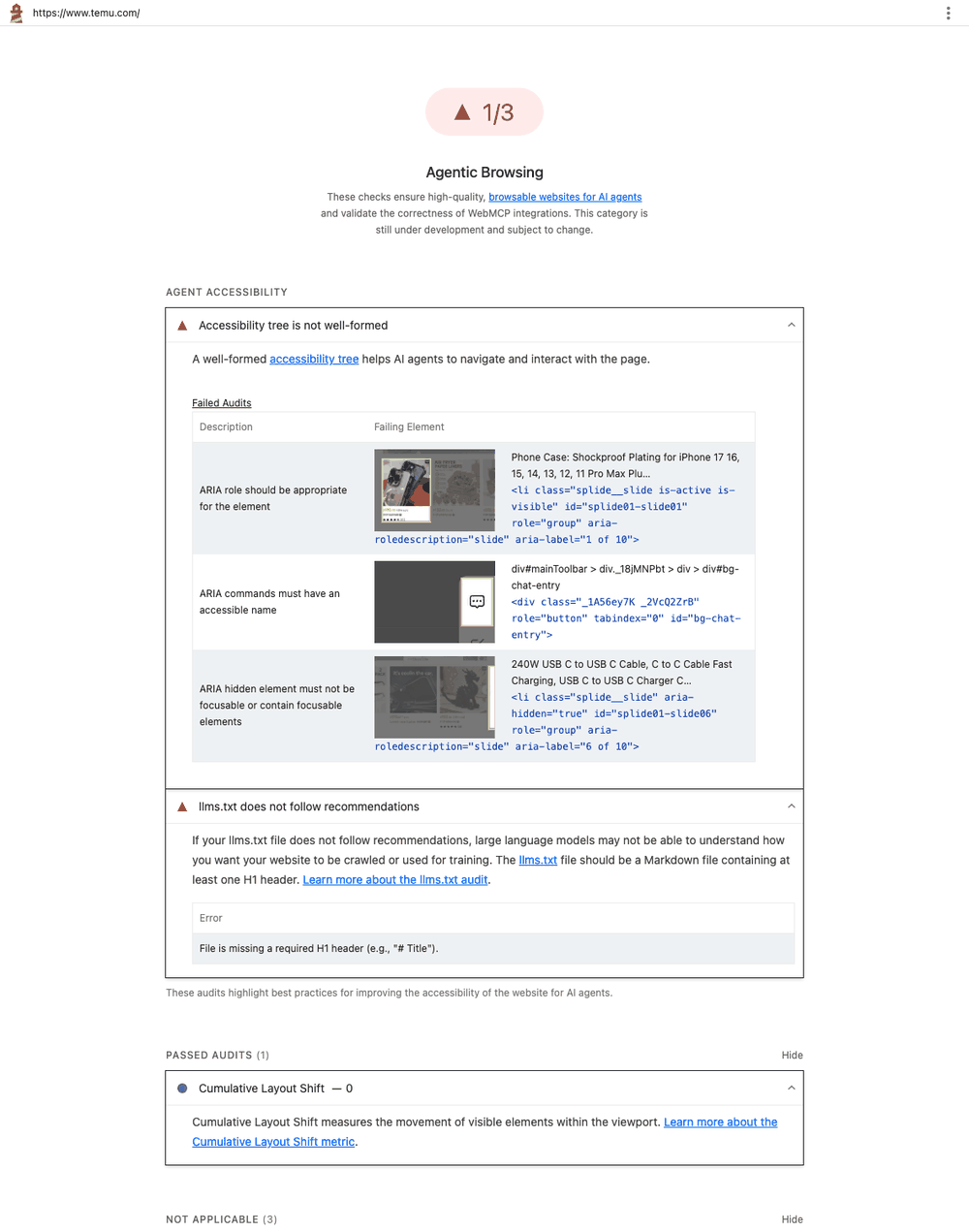
Finding 4 — the same two components fail everywhere
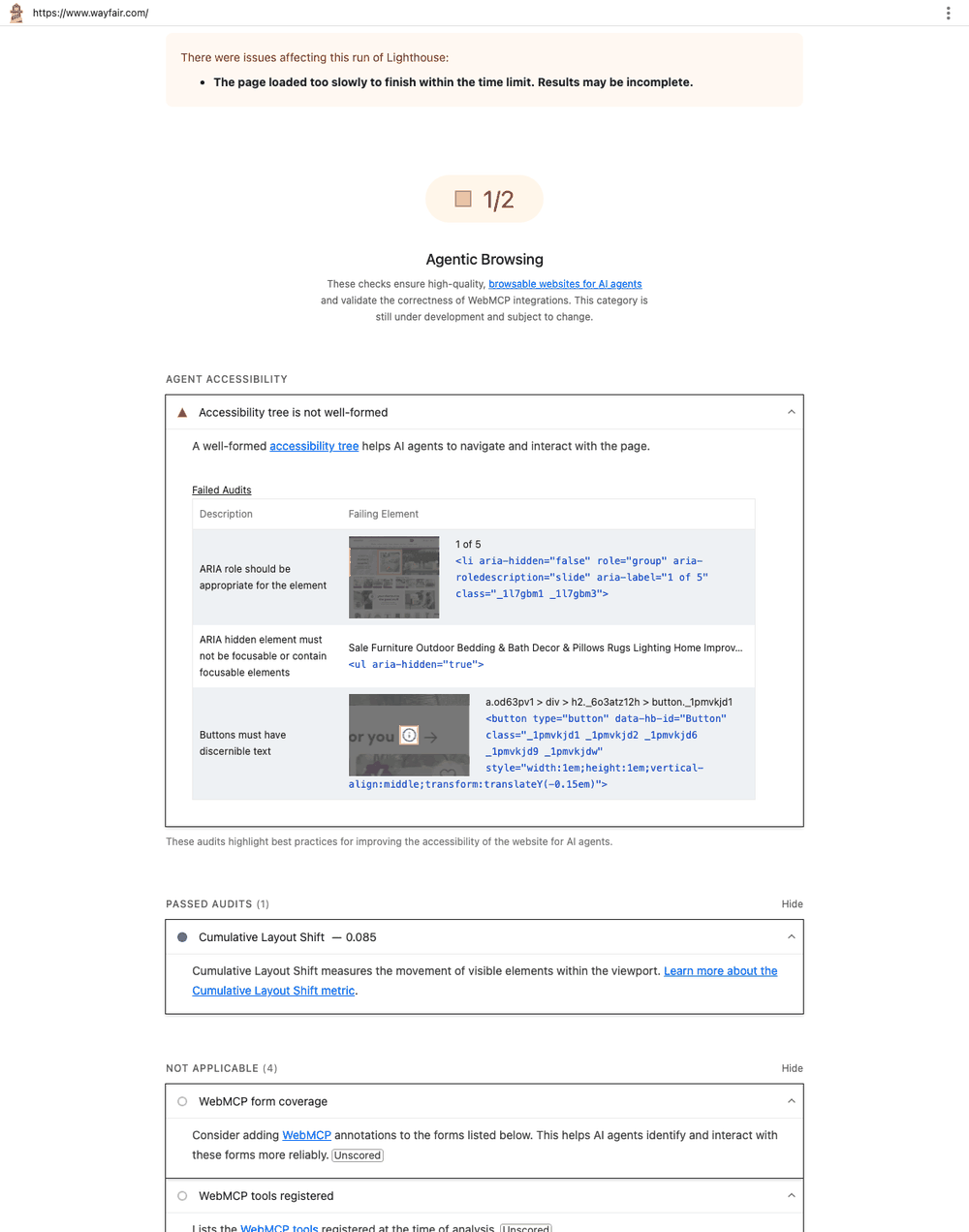
Across every failing site, the offending elements clustered into two categories. First, carousels:
| Site | Failing element |
|---|---|
| Temu | <li class="splide__slide" aria-hidden="true" role="group"> |
| Wayfair | <li aria-hidden="false" role="group" aria-roledescription="slide"> |
| AliExpress | <div class="swiper-button-prev" role="button" aria-label=""> |
Off-screen slides marked aria-hidden="true" while still containing focusable children was the single most repeated defect in the sample. An agent tabbing through the page lands on elements the page claims are not there. AliExpress’s is the purest example of the genre — a carousel arrow carrying aria-label="". Someone added the attribute and never filled it in, which is strictly worse than omitting it: an empty label overrides the fallback the browser would otherwise compute.
Second, chat widgets. Temu’s failure:
<div class="_1A56ey7K _2VcQ2ZrB" role="button" tabindex="0" id="bg-chat-entry">A role="button" with no accessible name — their chat entry point. Wayfair had the same class of defect on an unlabelled <button>. We found the identical bug in our own widget. Three independent teams, same mistake, same component type. If you ship or embed a chat widget, check that one first.
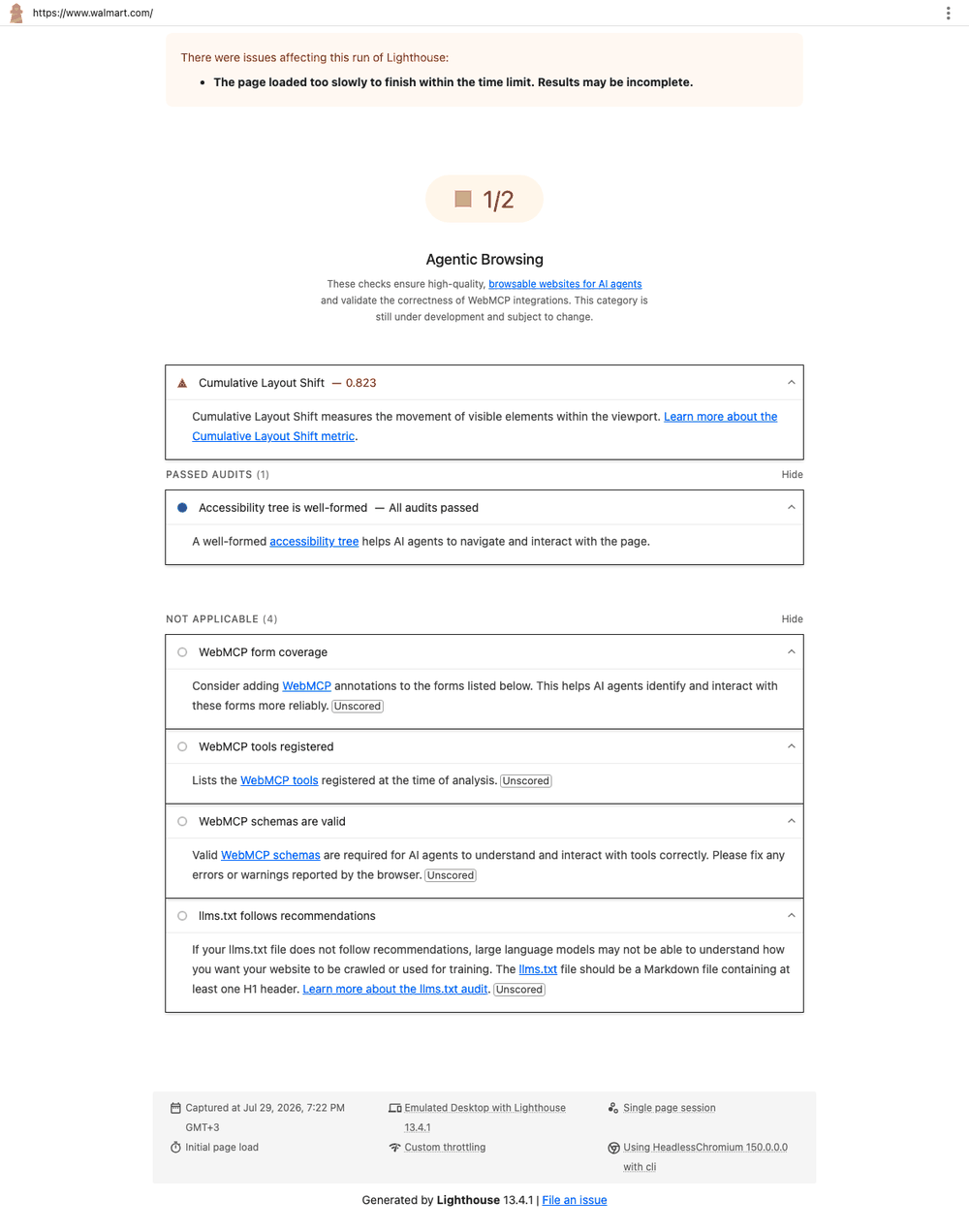
Finding 5 — Walmart’s problem is stability, not semantics
Walmart scored 0.52 with a perfectly clean accessibility tree. Its failure was CLS: 0.823, against a “good” threshold of 0.1.
For a human that is an annoying, jumpy homepage. For an agent that screenshots to disambiguate, it means the coordinates it reasoned about are stale by the time it clicks.
What the benchmark actually shows
| Observation | Sites |
|---|---|
| Perfect score with zero agent-specific work | Amazon, Lowe’s |
Real, well-formed llms.txt | SHEIN (1 of 15) |
| Any WebMCP implementation | None (0 of 15) |
Failed llms.txt they never wrote | Temu, AliExpress |
| Refused the audit entirely | Best Buy, Costco, Home Depot, Etsy, Target, Chewy |
The headline is that not one of the fifteen largest ecommerce sites has implemented WebMCP. Not one. The standard everyone is writing think-pieces about has zero adoption at the top of the market.
Which tells you exactly where the leverage is. You do not need to win a race nobody has entered. You need a clean accessibility tree and a stable layout — and on that far more boring axis, more than half the giants are already losing.
So is it a game changer?
No. It is a leading indicator worth acting on. The honest split:
| Claim | Reality |
|---|---|
| It is a new ranking factor | No. Google has not made it one. |
llms.txt will boost AI visibility | Google stated in June 2026 that it will not harm nor help rankings in Google Search. |
| You will be penalised for failing | No. Missing features return N/A. A bare site passes. |
| Everyone’s traffic is agentic now | All AI browsers combined are projected at 1–3% of the global browser market in 2026. |
| You need WebMCP to compete | 0 of the 15 largest ecommerce sites have implemented it. |
The strongest argument for doing the work has nothing to do with Google. Agents are already visiting your site and already failing at it. If an agent cannot complete checkout on your store, you lose the order — whether or not Lighthouse ever scores you for it, and whether that traffic is 1% of your total or 20%.
The second-strongest argument is that the work is cheap and dual-purpose. Two of the six audits improve outcomes for human users and existing SEO regardless of what happens to the agentic web. The weakest reason is to chase a score: the category is experimental, the numbers are noisy, and the checks will change.
Priority order
| # | Task | Effort | Value if agents never take off |
|---|---|---|---|
| 1 | Accessible names on every interactive element | Medium | High — real accessibility and SEO win |
| 2 | Fix CLS | Medium | High — Core Web Vitals |
| 3 | Make sure unknown paths return a real 404 | Trivial | Medium — fixes a genuine soft-404 bug |
| 4 | WebMCP on your top conversion flow | High | Low — speculative, origin trial |
Do 1 and 2 because they pay off either way. Do 3 because it takes minutes. Do 4 only for your highest-value flow, and only if you can maintain an origin-trial API through its rename cycle — the namespace has already moved from window.agent to navigator.modelContext to document.modelContext.
The benchmark makes the ordering concrete. Amazon and Lowe’s scored a perfect 1.0 having done none of items 3 and 4. Meanwhile Wayfair, Temu and AliExpress are losing points on unlabelled buttons and broken carousels. The gap at the top of the market is entirely in items 1 and 2.
Method, so you can argue with it
One homepage load per site, Lighthouse 13.4.1, desktop preset, single run, no authentication, no product or checkout pages. Scores fluctuate between runs by Google’s own admission — dynamic tool-registration timing, accessibility-tree construction variance, and layout shifts from ads all move the number. Four runs reported incomplete page loads and are marked with an asterisk on the chart. Captured 29 July 2026; any of these sites may have shipped fixes since.